
MCP setup guide
OpenCode MCP Setup: 7 Steps for Local and Remote Servers
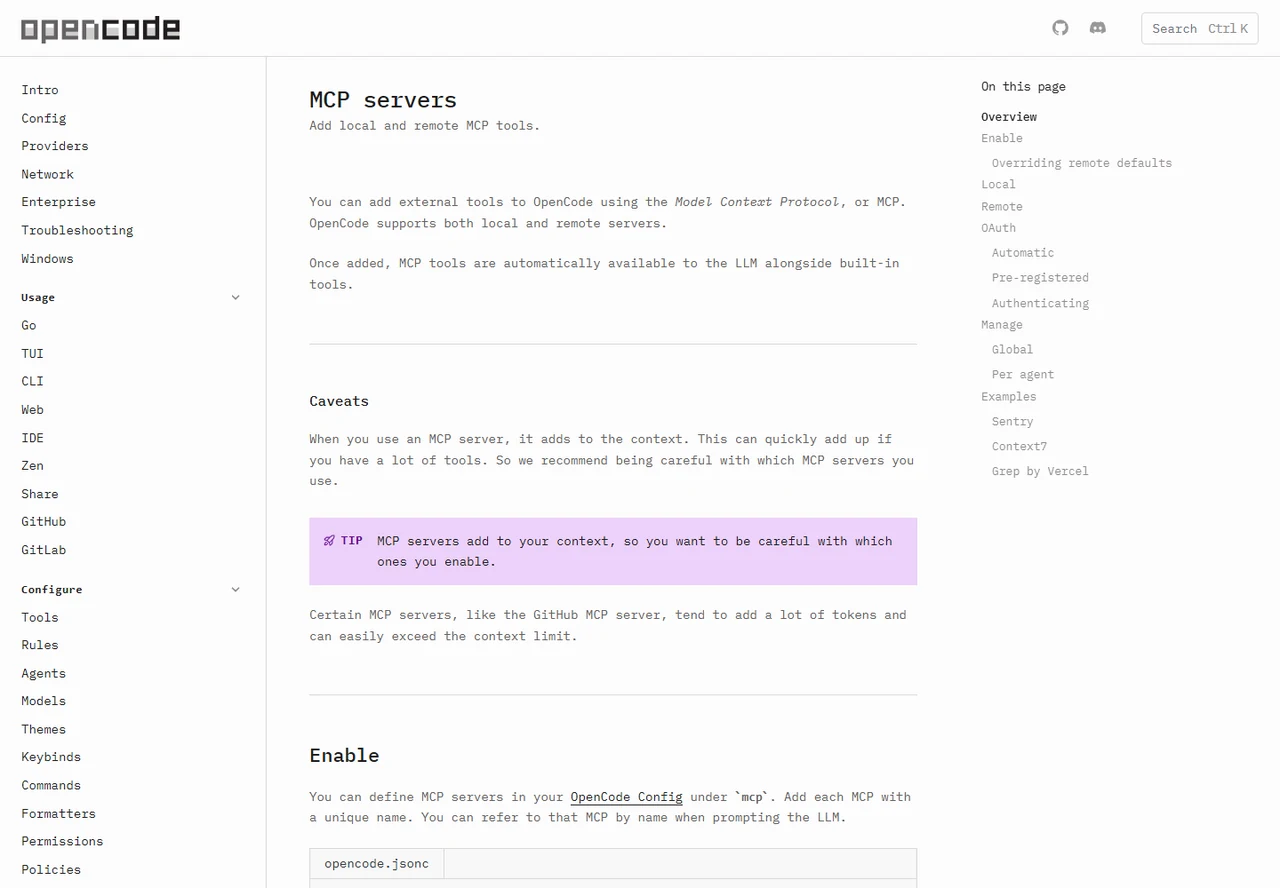
The practical answer: add each MCP server under the mcp key in your OpenCode config, choose local for a process that runs on your machine or remote for an HTTP endpoint, then run opencode mcp list before asking an agent to use the tools. Start with one narrowly useful server. Every enabled MCP adds tools and context, so a smaller verified setup is usually more reliable than a large unreviewed catalog.
- Primary keyword
- opencode mcp
- Updated
- Verified against official docs on July 11, 2026
- Reading
- 16 min read
Quick answer
OpenCode MCP
This guide covers the distinct OpenCode MCP search intent: how to add, authenticate, verify, limit, and troubleshoot external tools. General installation remains in the deployment guide, local model setup remains in the Ollama guide, and session files remain in the storage guide. Keeping those boundaries clear prevents a configuration tutorial from competing with broader install pages.
The examples below use the current official OpenCode schema and commands. MCP providers can change URLs, package names, scopes, and authentication requirements independently, so confirm provider-specific values at the server owner's official documentation before committing a team configuration. Never copy an unknown command or token header simply because it appears in a directory listing.
1. Choose local or remote before editing JSON
A local server is a child process started by OpenCode. It is appropriate when the provider ships a trusted CLI package, needs direct access to local files, or must stay inside the workstation. Its reliability depends on the runtime, package manager, working directory, environment variables, and operating-system permissions.
A remote server is an HTTP endpoint. It is often easier for shared services such as documentation search, issue monitoring, or hosted database tooling, but it introduces network availability and authentication. Choose the transport from the provider's supported installation method, not from a preference for one JSON shape.
| Decision | Local MCP | Remote MCP |
|---|---|---|
| Where it runs | A process on your machine or build host | A provider-managed or self-hosted URL |
| Required fields | type and command array | type and URL |
| Typical auth | Environment variables | OAuth or request headers |
| Main failure | Runtime, package, PATH, or process exit | DNS, TLS, 401, scope, or timeout |
| Best first use | One trusted, narrow local tool | One official hosted integration |
2. Put MCP configuration in the right OpenCode file
OpenCode merges configuration sources rather than replacing the entire file. Official precedence currently starts with organization remote defaults, then global config, custom config, project opencode.json, .opencode directories, inline content, and managed settings at the highest tier. A later source overrides only conflicting keys while unrelated values remain merged.
Use ~/.config/opencode/opencode.json for user-wide preferences and a repository-root opencode.json for project-specific tools. OpenCode searches from the current directory toward the nearest Git root. Project config can be reviewed with the codebase, but secrets still belong in environment variables or a credential flow, not in Git.
Give every server a stable, descriptive key. That key becomes the name you refer to in prompts and the prefix used for its tools. Avoid generic names such as server1, because logs, per-agent rules, and incident notes become difficult to understand later. Keep enabled: false for optional servers that should remain documented without loading on every session.
3. Add a local MCP server safely
A local MCP entry needs type: "local" and a command array. The first item is the executable and the remaining items are arguments. Arrays avoid shell-quoting ambiguity and make the intended process clear across machines. Use cwd only when the server genuinely depends on a directory, and remember that relative paths resolve from the workspace.
Treat npx -y examples as executable supply-chain decisions. Pin a package version when stability matters, verify the publisher and source repository, and test the package outside a sensitive codebase. For a team, record the expected Node or Bun version and whether the package is downloaded on each launch or installed through a controlled dependency workflow.
Pass secrets with the environment object using OpenCode environment substitutions rather than literal values. Give the token only the scopes needed by that server. If the tool can write files, create issues, modify databases, or call production APIs, start in a sandbox or read-only account and inspect the tool list before granting broader access.
{
  "$schema": "https://opencode.ai/config.json",
  "mcp": {
    "docs_search": {
      "type": "local",
      "command": ["npx", "-y", "trusted-mcp-package"],
      "enabled": true,
      "environment": { "MCP_TOKEN": "{env:MCP_TOKEN}" }
    }
  }
}
Replace the placeholder package only with the exact command published by the MCP server owner.
4. Connect a remote server and complete OAuth
A remote entry needs type: "remote" and an HTTPS URL. Use headers only when the official provider documents header-based authentication. OpenCode supports environment-variable references inside header values, which keeps the secret out of the repository while leaving the required header name reviewable.
For OAuth-enabled servers, OpenCode can detect a 401 response, attempt dynamic client registration when supported, open the browser authorization flow, and store tokens for later requests. Run opencode mcp auth <server-name> to trigger authentication deliberately, opencode mcp auth list to inspect status, and opencode mcp logout <server-name> to remove stored credentials.
If a provider supplies a client ID, secret, and scopes, place those values in the oauth object with environment substitutions. Do not request broad scopes by default. Set oauth: false only when a server intentionally uses API keys or another mechanism and automatic OAuth discovery would be wrong.
{
  "$schema": "https://opencode.ai/config.json",
  "mcp": {
    "monitoring": {
      "type": "remote",
      "url": "https://provider.example/mcp",
      "oauth": {}
    }
  }
}
5. Verify tools before using them in a repository
Do not make the first test a production action. Start with opencode mcp list; confirm the server appears, the connection state is healthy, and authentication is recognized. For OAuth or connectivity failures, opencode mcp debug <server-name> checks the HTTP path and discovery flow without forcing you to guess which layer failed.
Next, ask OpenCode to name the available tools from that server or perform a read-only query with an explicit server name. Check whether the tool result matches the provider directly. Then try one low-risk repository task and inspect the Git diff or external change log before allowing writes.
A good verification note records the server name, local package or remote URL, runtime version, authentication method, expected tool prefix, successful read-only prompt, timeout, and rollback command. This turns a personal experiment into a setup another developer can reproduce.
- Confirm the providerUse the server owner's official package, endpoint, and authentication instructions.
- Choose the scopeDecide whether the server belongs globally, in one project, or only on one agent.
- Add one entryUse a unique name and enable only one new server at a time.
- Supply credentials safelyReference environment variables or use OAuth; never commit a live secret.
- List and debugRun the MCP list command and debug connection or OAuth failures.
- Test read-onlyCall a narrow query and compare the result with the source system.
- Grant writes deliberatelyAdd write scopes only after logs, diffs, and rollback have been tested.
opencode mcp list
opencode mcp auth <server-name>
opencode mcp debug <server-name>
opencode mcp logout <server-name>
6. Control context, permissions, and per-agent access
Every MCP tool description consumes context. A server with dozens of tools can reduce the space available for repository code and instructions, and several broad servers can exceed a model's context limit. Disable unused servers, prefer narrow tool sets, and compare prompt quality before and after adding an integration.
OpenCode lets you disable matching tools globally with patterns and re-enable them for one agent. This is useful when a database or monitoring integration belongs to a specialist workflow but should not appear in normal coding sessions. Match the real tool prefix generated from the server name; do not assume the server key alone covers every tool.
MCP access is not a substitute for OpenCode permissions or provider-side authorization. Use read-only credentials, development projects, branch protection, audit logs, and approval rules together. A model can call only the tools it receives, but each tool can still carry the privileges of its token.
Continue with the OpenCode session storage and privacy guide before sharing logs or credentials, and review the OpenCode Ollama guide if MCP tools will run beside a local model with a smaller context window.
7. Troubleshoot the failing layer
Change one layer at a time. First prove the underlying local command or remote endpoint, then prove authentication, then prove OpenCode discovery, and only then adjust prompts or per-agent rules. Rewriting JSON while the provider itself is unavailable creates misleading results.
For local servers, run the exact command in a clean terminal and capture bytes as UTF-8 if a Windows wrapper processes stderr. For remote servers, verify the official status page and endpoint, then use OpenCode's debug command. Rotate any credential that was accidentally printed during troubleshooting.
| Symptom | Likely layer | First check |
|---|---|---|
| Executable not found | Local runtime | PATH, package manager, and command array |
| Server exits on startup | Local process | Run the command directly and inspect stderr |
| 401 or browser loop | Remote authentication | URL, OAuth status, scopes, and clock |
| Tools never appear | Config or discovery | Resolved config, server name, enabled state |
| Requests time out | Network or provider | DNS, TLS, proxy, server health, timeout |
| Agent ignores a tool | Prompt or tool policy | Tool prefix, global pattern, per-agent rules |
| Context becomes poor | Tool volume | Disable broad servers and compare token use |
OpenCode MCP use cases: Figma, Supabase, docs, and monitoring
Search data shows strong interest in opencode figma mcp and opencode supabase mcp, but each provider has its own permissions and deployment model. This page therefore explains the shared OpenCode layer instead of publishing unverified provider-specific JSON. Use the official Figma or Supabase MCP instructions, then apply the local/remote, credential, verification, and context checks above.
Documentation search and monitoring servers are often good first integrations because a read-only query has an observable result. Database, source-control, and design tools can be valuable, but their write scopes raise the cost of a mistake. Separate discovery from mutation and document which prompts are approved for each environment.
The broader term opencode github has navigational intent and belongs on GitHub or the official project page, not on a competing article. A specific GitHub MCP setup may justify its own guide only when it can add verified installation, scope, and rollback details beyond this shared setup page.
For installation fundamentals, return to the OpenCode deployment guide. For official configuration precedence and MCP options, use the sources below.
OpenCode MCP FAQ
How do I add an MCP server to OpenCode?
Add a uniquely named entry below mcp in the resolved OpenCode config. Use a local command array or a remote URL, supply credentials through environment variables or OAuth, and verify it with opencode mcp list.
Where should OpenCode MCP configuration live?
Use global config for tools you need across projects and repository opencode.json for project-specific servers. Remember that OpenCode merges sources and later precedence can override conflicting keys.
How do I authenticate a remote OpenCode MCP server?
For OAuth servers, use opencode mcp auth <server-name>. For documented API-key servers, reference an environment variable in the required header and disable OAuth only when the provider says to do so.
Why does an MCP server increase token usage?
OpenCode exposes the server's tool descriptions to the model. Many tools consume context before a call is made, so disable unused servers or limit them to a dedicated agent.
Should I install Figma or Supabase MCP globally?
Usually start at project or agent scope. Verify read-only behavior and permissions first, then promote it to global config only when most repositories genuinely need it.
Official sources checked July 11, 2026