Check the runtime
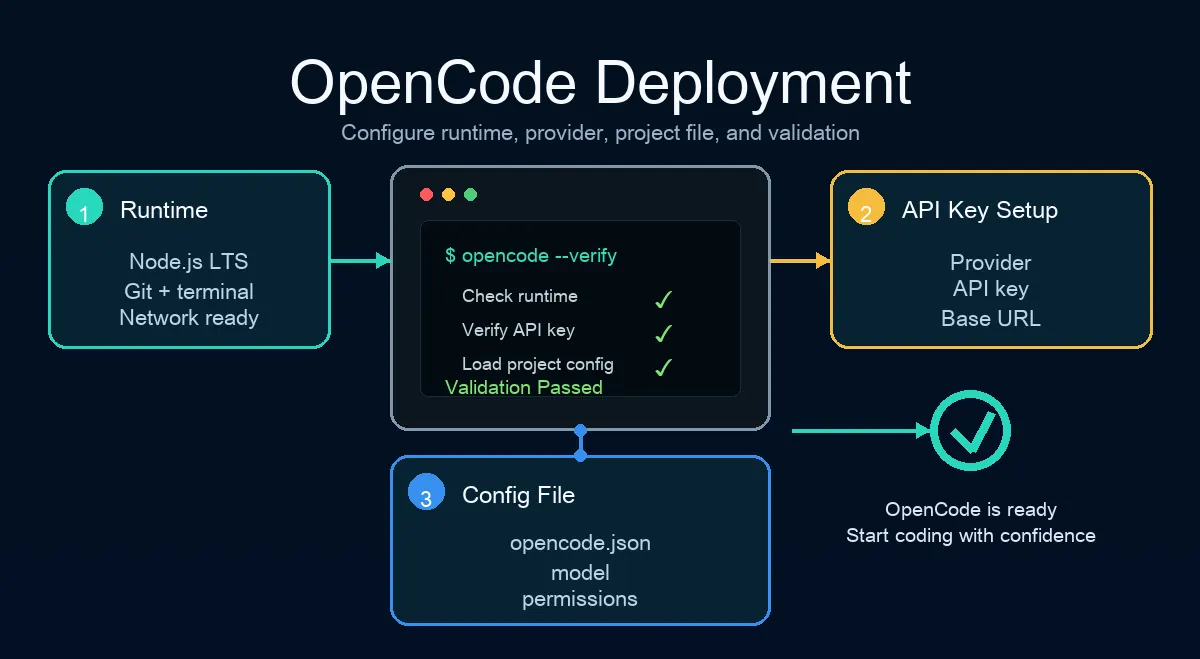
Prepare Node.js LTS, Git, a clean project folder, and a terminal that can reach your model provider.
 OpenCode Guide
2026 practical guide
This guide is for developers who want OpenCode running quickly. It covers the environment check, CLI installation, provider connection, project configuration, validation tasks, and the common failures that usually block a first deployment.
Quick Start
Use this sequence for a first install or when moving the same setup to a new machine.
Prepare Node.js LTS, Git, a clean project folder, and a terminal that can reach your model provider.
Use the official installation method, then confirm the opencode command is available in the current terminal.
Add one provider first. Keep API keys in environment variables or a secure credential store, not in the repository.
Start with a stable and affordable model. Verify the model ID from the provider dashboard or API docs.
Use opencode.json for non-secret project preferences such as permissions, ignored paths, and default model choices.
Ask OpenCode to explain a file, edit a low-risk file, and run a test or formatting command.
Record your Node version, provider, proxy settings, default model, and common errors for later reuse.
Provider
Most deployment failures come from API keys, base URLs, model names, proxy settings, or overly broad permissions. Connect one provider first, then add backups.
| Check | Recommended action | Common mistake |
|---|---|---|
| API key | Store it outside the repository. | Committing secrets to Git. |
| Base URL | Use the official or compatible endpoint. | Missing protocol or using the wrong path. |
| Model name | Copy the real model ID. | Using a marketing name instead of an API ID. |
| Permissions | Start conservatively and loosen after validation. | Allowing every command before testing. |
Use this as a non-secret configuration shape. Confirm exact fields with your OpenCode version.
{
  "model": "provider/model-id",
  "permission": { "edit": "ask", "bash": "ask" },
  "ignore": ["node_modules", ".env", "dist"]
}
Platform Notes
Use PowerShell for simple projects. Switch to WSL when your repository depends heavily on Linux tooling.
Confirm which Node installation your terminal is using, especially if you mix Homebrew, nvm, and system Node.
Use a normal user, protect API keys, and avoid long-running development tasks under root.
Plan comparison
Compare subscription pricing, pay-as-you-go billing, models, limits, privacy, and setup before choosing a plan.
IDE workflow
Install the IDE extension, launch sessions, share selected code, use file references, and fix PATH or shortcut failures.
New guide
A focused guide to provider paths, credentials, model IDs, OpenAI-compatible endpoints, and failure-layer diagnosis.
Troubleshooting
Deployment Decisions
A reliable OpenCode deployment starts with a few explicit choices. Decide which model provider is the default, which model should handle normal code edits, which cheaper model can explain files, and which fallback provider you will use when latency or rate limits interrupt work. Write those choices down before inviting teammates to use the same setup.
Keep the OpenCode CLI close to the project workflow. The first validation should happen inside a small repository with Git history, tests, formatting, and a harmless command. That gives you evidence about file reading, diff quality, command approval, and recovery after a mistake without risking production code.
The most common mistake is treating opencode.json as a secret store. Use it for non-secret preferences such as default model, ignored folders, and permission posture. API keys, provider tokens, proxy credentials, and private base URLs belong in environment variables, a password manager, or the provider's recommended credential path.
Validation
After installation, test the deployment in layers. First confirm the opencode command launches from a fresh terminal. Next confirm the model list loads. Then ask OpenCode to summarize a small file, edit a documentation line, and run a read-only command. Only after those checks pass should you allow broader edits or project-specific automation.
Record the exact Node.js version, OpenCode version, provider name, model ID, operating system, shell, and proxy setting used during the successful test. That note saves time when the same machine later fails after a shell profile change, a provider outage, or a model rename.
For teams, add a short onboarding note to the repository: how to install the CLI, where opencode.json lives, which paths are ignored, which commands require approval, and how to report a failed provider connection. The note does not need to be long; it needs to be accurate enough for the next developer to reproduce the working deployment.
Maintenance
Treat the first working setup as a baseline rather than a permanent configuration. Review model IDs, provider pricing, permission rules, and ignored paths whenever the project changes deployment scripts, adds generated output, or starts handling sensitive data. OpenCode can be flexible, but flexibility needs a small amount of maintenance.
When troubleshooting, separate four layers: local runtime, network path, provider credentials, and project permissions. A missing command points to installation or PATH. An empty model list points to provider access. A timeout usually belongs to network, proxy, quota, or provider availability. A denied edit usually belongs to workspace permissions or policy.
Use Git as the final safety net. Before trusting a new OpenCode deployment, confirm that every generated edit is easy to inspect, revert, and explain. A good setup is not just one that answers quickly; it is one that leaves clean diffs and predictable command history.
If the setup will be shared, schedule a short review after the first week. Check whether developers used the documented model, whether approval prompts blocked real work, whether ignored folders covered build output, and whether the provider connection stayed stable. Update the guide from those observations instead of waiting for a larger migration problem, and keep a short changelog so future troubleshooting starts from known configuration changes. Recheck the baseline after provider updates.
FAQ
Install Node.js LTS, Git, a usable terminal, and at least one model provider API key.
Project-level configuration usually belongs in the repository root, but never commit secrets.
Run three small checks: read a file, edit a low-risk file, and run a test or formatting command.